redaxle wrote: Why are people so afraid of Blender? Completely different UI and function sets. If someone can tell me what the Blender counterpart to Max's "Relax" modifier is, and if i can hide specific mesh/geosets of the model (had different programs where i couldn't, so it's not like that's a given) i would probably be able to work with it given some time. _________________ My nude mod Threads: , ,
ScDK wrote: OMFG... XD That's customized animations, if i understand right. You did all that, while i simply extended the weight of the breast bones on the Belf Femme's torso? XD God i'm so awful X_X;Yes, by hand from the ground all the way up Baby. But if u already manipulate vertex weights, then u almost there where i was about a week ago. That is the most painful part of blender even with vertex paint imo. Rigging, posing and animating a well weighted model is a lot of fun on the contrary.
If u want the fun of figuring it out yourself this ll be a spoiler for u. Otherwise these are what i have found out in a week. (There is a for greater reference.)
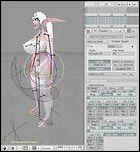
Here is a picture of the rig setup im using set in resting pose, constraints deapplied. The transform orientation is set to 'Normal' so the bones are rotated based on thier current orientation. Shortkeys like X Y do constraint on global, so the transform gizmo must be used instead. A big help can be the transform properties. (Press N in the viewport) (Not on the pic)
-Timeline panel (Top right in the pic.) Its the bread and butter. U can jump to different frames in the animation, and set keys with the shortkey (I) for the current selection's position/rotation etc. It shows with green lines the keyed frames.
Tip: Dont choose the first frame of the timeline as the first frame of a cyclic animation. U ll want lead-in and lead-out keyframes for a smooth transition. These are essencially a copy of the first and last keyframes of each bone in the animation, just put behind and before the animation respectively. Its like having 3 cycles of the animation, but using only the middle one for the rendering.
-Inverse Kinematics (IK) Chain (The Constraint on the buttons window in the pic) For all its options u should read the . But one stuff isnt in the constraints panel, but the 'Armature Bones' panel. Limit X Y Z limits the IK solver's freedom so u dont have very wierd results from it. The X and Z limits also visible in the viewport as ellipsoids. (Well, its rather a red curve for the lower legs, because the Z is set to zero-zero) Altho it never gives a perfect result, and should be readjusted by rotating individual bones
Edit: -Only the limbs are lead by the IK solver. They are adjactent to the body, and should end in a specific point. (Like feet on the ground) The main body bones are manipulated on its own. And or the stuff that just hangs freely from the body, like the tits and hair. I animated those after i was done with the body. The trick with these to is to set thier key positions with a delay compared to the thing they attached to. It applies to individual bones of hanging bone chains, or even to the body itself.
With this two u can already manage similar results as i did. (Im in a hurry, so dont hold me at my word if its not entirly true x)
-
Another type of animation are the Shape Keys, absolute and relative types. The former is to deform the mesh in an animation rather than posing. The latter is to deform the animation to have in example different emotions, or body types. (Yup breast expansion right there ) An adjactent concept is the IPO driver.
U could dwelve into IPO curves, but thats more for finetuning of the acceleration of changes. And Action editor... Well, i couldnt wrap my head around that yet...
Thats all i have learned so far. Have fun running your own experiments with it.
Edit: Because im in a hurry x( _________________ The Sculptor
You don't need to use Blender to migrate older edits to the new version.
Basically, this is how you do it: 1. Convert the old model to M2I. 2. Merge the new model with the M2I from the previous step. 3. ??? 4. PROFIT
This won't work if Blizz changed the bones at all, like if they have been reordered or if they removed or added some bones, etc. Then you'd have to go into Blender and try to wrap your head around what bones changed get the meshes to skin to the correct bones. _________________ Want to work on a game? I am looking for volunteer Blender 2.5 artists and animators to work on characters and environments. Message me for more details.
Heya, i used your tool and blender to edit and existing model edit, all i did was simple make the blood elf pony tail hair style longer, but when i run the game it crashes before it even loads my characer on screen, i tried taking out the .Skin files and leaving just the .M2 model edit in the Mpq, when i did this i got this:
So it either crashes or this happens, what have i done wrong?
Omg i love this mod so much =D. Thanks so much for making this mod, i couldve never made my own mods without it, thanks so much and i hope you continue to update this even after cata bc i really like using this. Its a good time killer and ye, if anyone wants to start moding use this bc i owe all my moding skills to this guide and mod lol _________________ Kiwi388's pregnant mods: Regularly updated and done for all alliance races and most horde ones.
"Its not an adventure if someone doesnt faceplant"
Maybe someone else is willing to test for me or cares about the camera issue.
Here is my blender file with the camera in the new 'correct' position:
At least for me, if the model is exported to m2i (The desired but unfinished model is layer 1, though layer 2 also has the camera in the right position), and then re-imported, the camera has done a loop-de-loop and is now facing away from the character and at the floor. To get it to work the first time resulted in having to screw with importing and exporting and making odd tweaks until at some point the export script placed the camera in such a way that the outcome was desirable. Even the end result which I'd used for a few months and uploaded for others wasn't the intended orientation. It just ended up being the first one that wasn't completely wonky.
Whenever the camera is faced away from the character, you get no portrait, or in some cases some really super bizarre angle or cutaway of the model when tested in-game. However with the new m2mod tool, it seems to ignore the new camera position completely. This might explain why one of the earlier posters stated they messed with the camera and noticed no change.
Anyway, I uploaded my blender file in the hopes you might have time/care to look at it and see if it's something on my end that I'm doing wrong or if it's something in the tool/script that might be fixable. I'm probably going to stick to my broken animation models until then.
redaxle wrote: It should fix the animation freeze, but that issue isn't something that I've experienced myself so I can't say for sure.
Ok, version 4 is out now, check OP to download it. Unfortunately I didn't make one tool to handle both versions of M2 of v3 and v4. It's easier to just make a new separate version.
Anyway, let me know if you guys have any problems with it so I can fix them. I haven't tested it that extensively.
Thanks for update!
i tried to model change, but.. my model has broken. it seems to Character new face & hair parts animation problem.
Trollpaxton wrote: The latest/final version of MWCS should be 0.10.6337, I think.
Simple things first: are you making sure that the .skin files for the model are in the same folder as the .m2?
Hah. No. I don't know very much about models, and I assumed the .m2 was all I needed. (also the version of mwcs i listed was the exe's version; it actually is version 10 from zilem's guide). I'll try this when I get back to my PC.
I guess it was
- it's 6am and i'm totally missing something obvious
Ah yes, that is very important, always keep the *.skin files (of the same name as the m2) with the *.m2 in the same folder. It's good to get into the habit of thinking of and treating them as one file because they won't work without each other. _________________ Want to work on a game? I am looking for volunteer Blender 2.5 artists and animators to work on characters and environments. Message me for more details.
Users browsing this forum: No registered users and 0 guests
You cannot post new topics in this forum You cannot reply to topics in this forum You cannot edit your posts in this forum You cannot delete your posts in this forum You cannot post attachments in this forum




















 )





