Nude mod

Nude mod, nude patch and nude skins forum
Home Page FAQ Team Search
Login 
View unanswered posts View active topics  

Delete all board cookies

All times are UTC [ DST ]


New Topic Post Reply  [ 366 posts ]  Go to page
 Previous << 
1 ... 3, 4, 5, 6, 7, 8, 9 ... 37
 >> Next 
  Print view
Previous topic | Next topic 
Author Message
Posted: Tue Nov 02, 2010 7:06 am 
Gamer Lv:0 Exp:5%
Gamer Lv:0 Exp:5%

Joined: Fri Oct 29, 2010 2:47 pm
Posts: 7
Alright, the tools great, but blender sucks ass. (I don't usually swear but I'm pissed)

I myself, edit models in Autodesk Maya 2009. Using blender (were I almost killed myself trying to work with this damn thing)

Steps I did:

1 Follow the guide (This all worked fine)
2. Model is imported into blender, everything is fine.
3. Export as an .FBX and import into Maya.
4. Edited the model and exported back as a .FBX.
5. Attempt to import back into Blinder and realize, I can't import .FBX into blinder (This is were I went WTF?!)
6. Go back to Maya, and export as an .OBJ
7. Import into blinder and export as .m2i
8. Exporting Failed - Root Object of Selection was not an armture.

Ok, I'm not quite sure what the hell that means, only that I spent the last 7 hours for an error report.


(Your program is good, you just picked a retarded program to base it around)


Anyone have any idea what I can do? (And if you are going to say learn to use blinder don't even reply)


EDIT: Well. It seems that .obj is dropping some data. Time to figure out a format I can use as a data bridge.


Top


Posted: Tue Nov 02, 2010 11:24 am 
User avatar
Gamer Lv:0 Exp:0%
Gamer Lv:0 Exp:0%

Joined: Tue Nov 02, 2010 10:27 am
Posts: 4
Use M2's from oldworld.MPQ, that seems to be the current version in use by the game. M2's from art.MPQ are unfinished and contain broken animations.
_________________
Want to work on a game? I am looking for volunteer Blender 2.5 artists and animators to work on characters and environments. Message me for more details.


Top
   
 
Posted: Tue Nov 02, 2010 4:16 pm 
User avatar
Gamer Lv:0 Exp:5%
Gamer Lv:0 Exp:5%

Joined: Tue Nov 02, 2010 3:19 pm
Posts: 5
Hmm yeah I don't know why it's messed up like that. Make sure to always make changes to meshes in edit mode rather than moving them around in object mode because object position is ignored by the exporter. I don't know if that's the cause but it's possible.

But good to hear you got it working Re: M2Mod tool + Cromon's Injector (v4.03)(2011.01.14)
_________________
Want to work on a game? I am looking for volunteer Blender 2.5 artists and animators to work on characters and environments. Message me for more details.


Top
   
 
Posted: Wed Nov 03, 2010 4:33 am 
Gamer Lv:0 Exp:0%
Gamer Lv:0 Exp:0%

Joined: Mon Oct 25, 2010 11:42 am
Posts: 3

redaxle wrote:
No sorry, it's impossible to do a straight conversion, sorry if you were getting your hopes up... It will take some elbow grease and blender skills to update old edits. It involves using the Bone Weight Copy feature to fix the bone weights. I'm working on a new guide now, I'll put it up soon.


Well shit.


Thanks for the information, though.


Top
   
 
Posted: Wed Nov 03, 2010 5:25 am 
User avatar
Gamer Lv:0 Exp:5%
Gamer Lv:0 Exp:5%

Joined: Wed Nov 03, 2010 4:27 am
Posts: 6

redaxle wrote:
Yeah, i wish it were easy... Right now I'm stuck on figuring out why any edits made to the human female model breaks the model. If I inject the unmodified M2I back with the original M2, it loads in game OK, but if I inject a modified M2I with the M2, it crashes the game. I've been looking for what might be breaking the model but I can't find anything anywhere.

It might have something to do with HumanFemale.m2 being patched by blizzard in build 13164 and 13287. I'll have a play around and see what I can manage.

Edit: Okay I got it working. I was right Re: M2Mod tool + Cromon's Injector (v4.03)(2011.01.14)

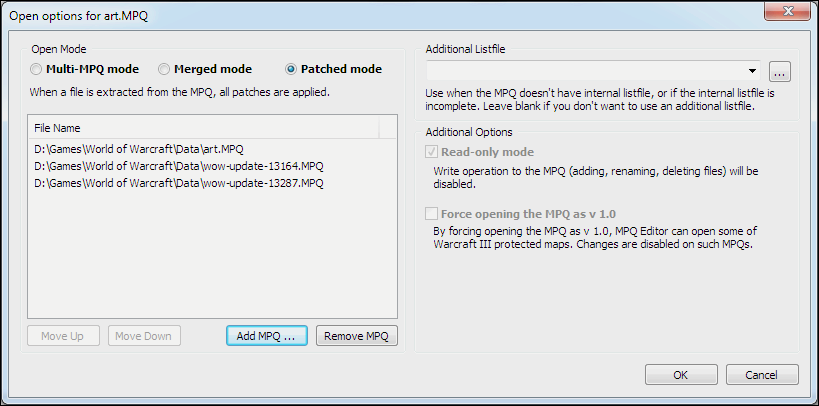
To get it to work you have to use the new feature in ladiks MPQ editor "Open MPQ With Options".

First open the art.MPQ, you will then get the options dialog. Select patched mode and add the relevent patches (13164 and 13287 in this case) to the list. I guess to be safe you could just add them all. I'm not sure if order matters but I just loaded them in numerical order. Hit ok and then extract the M2/skin/animations as usual.

Creating the MPQ is the same as usual. I didn't do anything special here.

Screenshot of the options:
Re: M2Mod tool + Cromon's Injector (v4.03)(2011.01.14)

And of course here is the obligatory proof of concept crude large tits:
Re: M2Mod tool + Cromon's Injector (v4.03)(2011.01.14)

Hope this solves the problem you were having. It should be applicable to any other M2s that have issues loading for other people too.


Top


Posted: Wed Nov 03, 2010 7:07 am 
User avatar
Gamer Lv:0 Exp:0%
Gamer Lv:0 Exp:0%

Joined: Wed Nov 03, 2010 6:09 am
Posts: 2
I just got the injector thing working so I will be working on updating my model edits and then if I encounter any issues with M2Mod, i'll try to fix them.
_________________
Want to work on a game? I am looking for volunteer Blender 2.5 artists and animators to work on characters and environments. Message me for more details.


Top
   
 
Posted: Wed Nov 03, 2010 9:07 am 
Gamer Lv:0 Exp:5%
Gamer Lv:0 Exp:5%

Joined: Sat Oct 30, 2010 9:38 am
Posts: 5
Umm, most likely the file can't be found... See this path?
C:\mod\wow\model\data\HumanFemale.m2

It should be set to wherever the file is that you want to convert. The M2 file has to be extracted from the MPQ archive using an MPQ editor. Then set the path to wherever you put the extracted M2 that you want to operate on is.

That default path configuration is just set that way to give you an idea of how typical usage might work. It won't work out of the box.

But if you already have the M2 extracted and at that location, then there's no reason why it shouldn't work.
_________________
Want to work on a game? I am looking for volunteer Blender 2.5 artists and animators to work on characters and environments. Message me for more details.


Top
   
 
Posted: Wed Nov 03, 2010 10:35 am 
Gamer Lv:0 Exp:0%
Gamer Lv:0 Exp:0%

Joined: Wed Nov 03, 2010 9:37 am
Posts: 4

redaxle wrote:
Shoot sorry, I forgot about it...

I couldn't find anything wrong with it. I got it working in game. It must be something you're doing wrong.

Make sure you merge the M2I with the latest version of BloodElfFemale.M2 + .skin found in patch-2.MPQ. And then make sure you include the outputted .M2 and .skin with your patch MPQ. Don't include any .anim files. Don't forget to include all the .skin files, there can be anywhere from 1 to 4 of these depending on the model. In the case of blood elf there will be 4. Do not set OutputM2 to the same folder as InputM2 or there will be overwrites which will corrupt the original files.

Aaaah i got it working now Re: M2Mod tool + Cromon's Injector (v4.03)(2011.01.14) its my fault, i missed a bit of text in the guide xD so tip to all: if it doesn't work make sure to read the guide again carefully Re: M2Mod tool + Cromon's Injector (v4.03)(2011.01.14)
Thanks for the tool and guide Re: M2Mod tool + Cromon's Injector (v4.03)(2011.01.14) i love it.


Top
   
 
Posted: Wed Nov 03, 2010 11:07 am 
Gamer Lv:0 Exp:0%
Gamer Lv:0 Exp:0%

Joined: Wed Nov 03, 2010 10:09 am
Posts: 3

TheYesMan0014 wrote:
EDITED:

The Error Goes like this:

C:\mod\wow\model\data\HumanFemale.m2
error: failed to load m2. could not open file
press any key to continue....

It's confusing as to why it's not working for me.Would you mind linking the input section of your M2Mod.ini please ?
_________________
Ry


Top
   
 
Posted: Wed Nov 03, 2010 8:50 pm 
Gamer Lv:0 Exp:5%
Gamer Lv:0 Exp:5%

Joined: Wed Nov 03, 2010 7:52 pm
Posts: 5
I appreciate every bit of work that has been put together to make these awesome tools and mods! Seriously. +over 9000 internets to everyone that has been working on this. (+rep if this was MMOwned).

Once you've figured (since I know you will) how to convert the old models, could you make a Worgen and Goblin patch? I know this is a lot for me to ask, but I believe I'm not the only one that's sick of looking at a Blizzard-animated Worgen in a WFI pose! Yes, I'm talking about Running Wild.

/bow

May the Earth mother guide you.. or something like that!


Top
   
 
Search for:
Display posts from previous:  Sort by  
New Topic Post Reply  [ 366 posts ]  Go to page
 Previous << 
1 ... 3, 4, 5, 6, 7, 8, 9 ... 37
 >> Next 

All times are UTC [ DST ]

 
  • Related topics

Who is online

Users browsing this forum: No registered users and 0 guests


You cannot post new topics in this forum
You cannot reply to topics in this forum
You cannot edit your posts in this forum
You cannot delete your posts in this forum
You cannot post attachments in this forum

cron
Not able to open ./cache/data_global.php








