|
| Author |
Message |
|
propelsys09
|
Posted: Fri Dec 24, 2010 2:46 am |
|
| Gamer Lv:0 Exp:5% |
 |
Joined: Fri Oct 15, 2010 2:01 pm
Posts: 6
|
|
|
|
I'm glad you got it working. I'll try to clear up your questions as best I can anyway.
Assertion errors happen when the model is loaded (and maybe when saved, too), so whenever you are loading a model that hasn't had it's views reduced you're going to get those assertions. If you want them to go away just run a pass where all you do is reduce the views, then use that modified M2 as your "base" model.
As far as what the other views are for...I really can't say for certain. LOD certainly seems likely, as there is actually an "LOD" field in the header for each view. However, the polycounts are pretty much the same across all views, which would make for pretty poor LOD'ing. I really don't know what is going on with those things. First of all, I can't understand how one view can pass all my "assumptions" (basically means that the data makes sense wrt to the view header I have) and the others don't. Second, it seems like some graphics apis and/or video cards need the extra views while others don't. My system doesn't, but there are a lot of people who just see black when they try to load an MPQ with a model that has gone through my tool in it. I forget exactly why, but I think that is at least partly because not only are they missing the extra views but that those views have a specific format or something. I really don't understand it.
If any blizzard programmers out there want to leak some m2 information to me I promise I will maintain the utmost confidentiality!
_________________
Skins:
Links:
|
|
| Top |
|
 |
|
Happy Monster's News
|
|
|
|
|
|
|
|
|
|
randallis88
|
Posted: Fri Dec 24, 2010 3:22 pm |
|
| Gamer Lv:0 Exp:0% |
 |
Joined: Mon Nov 01, 2010 11:00 pm
Posts: 3
|
|
|
|
poopypants619 wrote:
So my question is.... will there be any Beast enlargement mods that are just as easy to use...?
Yes, when/if the authors of the old mods update them for 3.0. T
_________________
Skins:
Links:
|
|
| Top |
|
|
|
fz22gq
|
Posted: Fri Dec 24, 2010 8:28 pm |
|
| Gamer Lv:0 Exp:0% |
|
Joined: Wed Oct 20, 2010 11:16 pm
Posts: 3
|
|
|
Quick question: went through the process, got a few assumption errors but it seemed to do its thing. Opened it in max 9, edited, but Im getting some seam problems in-game. Im seeing some separation on the elbows, waist, and back (cape) area. What would be the best way to fix this, start over? Thank you in advance for any help! Btw, Im trying to edit the human body, this is my first try, be gentle.  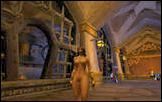 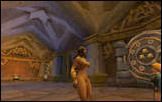 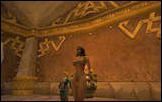 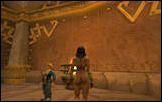 Besides increasing the bust size, I gave her a slightly thinner waist and ribcage. I probably selected more vertices than I should have without noticing...
|
|
| Top |
|
|
|
MattMj
|
Posted: Fri Dec 24, 2010 11:20 pm |
|
| Gamer Lv:0 Exp:0% |
|
Joined: Mon Nov 08, 2010 9:48 pm
Posts: 4
|
|
|
|
i wouldnt mind at all if boob jobs stayed a little closer to adhering to the laws of physics. ive only ever used the second smallest out of 4.
_________________
|
|
| Top |
|
|
|
najli
|
Posted: Sat Dec 25, 2010 1:02 am |
|
| Gamer Lv:0 Exp:5% |
|
Joined: Mon Nov 01, 2010 9:18 pm
Posts: 5
|
|
|
|
Thats about all I could get out of it too.
You can produce similar effects by messing with the vertice/bone weights or odd direct scaling of the vertex coordinates.
|
|
| Top |
|
|
|
Happy Monster's News
|
|
|
|
|
|
|
|
|
|
hafizzul
|
Posted: Sat Dec 25, 2010 5:37 am |
|
| Gamer Lv:0 Exp:5% |
|
Joined: Sat Oct 16, 2010 4:18 pm
Posts: 7
|
|
|
|
Goodness gracious, that was a pain in the ass to use, but the results were amazing. Thanks a lot, TP! BTW, your .ini file you provide has quotes on the input/output filepaths that have to be removed for it to work properly.
Also, the x/y/z ranges don't appear to be applied on the HandsClosed animation that we get in 3DSMax, but rather at an angle. Perhaps they're applied to animation 0 (Attack2H), but I always get asymmetric subdivisions with symmetric bounds.
|
|
| Top |
|
|
|
smart88
|
Posted: Sat Dec 25, 2010 9:19 pm |
|
| Gamer Lv:0 Exp:5% |
|
Joined: Sun Nov 07, 2010 4:54 am
Posts: 6
|
|
|
|
SwiftLippin wrote:
Zilem wrote:
I think this is gonna make SwiftLippin happy, Densetsu
I am happy with it, but sadly, being the stickler for plausibility that I am, they are simply too massive for me to use in game. I just find it really hard to imagine fit, low body fat women running around in battle and actually being able to function with F sized breasts, and that's going into it just thinking its a fantasy, there's a whole other argument for proportionality. For me, when given the option of sizes 1-4 with pepepacu's breast mod, I usually went for 2, sometimes for 3, never the 4 size, what Densetsu did would be an example of the 4 size. Perhaps, in the future, he will find the time to do a similar scaling.
That guy did some amazing work himself though, I consider Troll Size 2 to be basically perfect minus the slight glitching at the bustline.
|
|
| Top |
|
|
|
avoicein
|
Posted: Sun Dec 26, 2010 12:41 pm |
|
 |
| Gamer Lv:0 Exp:0% |
|
Joined: Tue Dec 07, 2010 6:28 am
Posts: 3
|
|
|
|
tancients wrote:
Would I be able to take current .m2 files and just drop them into the application and have it 'smooth' out things? I don't have access to a model editing program, but I'd like to keep the model change sizes etc the same, but smooth them out more.
No...here's a picture of a poly in profile:
Code:
O O
/ /
/ -> O
/ /
O O
Since the added vert is exactly along the edge of the poly the models shape stays exactly the same.
Edit: fixed so you can see the damn picture.
_________________
Skins:
Links:
Last edited by on Wed Jul 16, 2008 11:45 pm, edited 1 time in total.
|
|
| Top |
|
|
|
spinoza
|
Posted: Sun Dec 26, 2010 1:49 pm |
|
| Gamer Lv:0 Exp:0% |
|
Joined: Sun Nov 07, 2010 8:21 pm
Posts: 4
|
|
|
Densetsu wrote: I was actually going to ask if it might be possible to have a version to increase just the torso geoset (I'm beginning to step out of my bounds of expertise here). That might add enough polys to do some detail work like that, without making the total count too huge. The problem is that there is one geoset that contains the face, torso, upper arms, hands, and feet. However, I can make it so you specify a range of x,y,z values on the character to subdivide. The good news is that it was pretty easy to do: 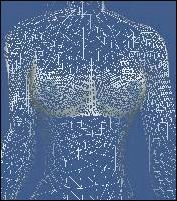 The bad news is it will take far longer to add some sort of interface to let you set those ranges than it took to actually do the work. >< _________________ Skins: Links:
|
|
| Top |
|
|
|
daveacc3
|
Posted: Mon Dec 27, 2010 4:22 am |
|
 |
| Gamer Lv:0 Exp:0% |
|
Joined: Mon Dec 20, 2010 10:37 am
Posts: 2
|
|
|
TP, i wondered if your tool is able to import only a given geometry, rather than the full model, when making a OBJ injection. Asking because i have some model parts that i really cannot reproduce as they used to be (or rather, too lazy to sit down a few hours to edit a single hair mesh again), and i doubt that replacing it 3ds max will simply work out, given it will most likely change the vertex order by placing the new mesh's vertexes at the very end of the list, rather than where the original one was. ...hmmm, i'll try it out, anyhow...until you answer  EDIT: NVM, i figured it out and wrote a small tutorial. It's in the Guides section. _________________ My nude mod Threads: , ,
|
|
| Top |
|
|
|
|

















