Nude mod

Nude mod, nude patch and nude skins forum
Home Page FAQ Team Search
Login 
View unanswered posts View active topics  

Delete all board cookies

All times are UTC [ DST ]


New Topic Post Reply  [ 394 posts ]  Go to page
 Previous << 
1 ... 13, 14, 15, 16, 17, 18, 19 ... 40
 >> Next 
  Print view
Previous topic | Next topic 
Author Message
Posted: Sun Nov 21, 2010 12:58 am 
Gamer Lv:0 Exp:0%
Gamer Lv:0 Exp:0%

Joined: Sun Nov 21, 2010 12:01 am
Posts: 3
Thanks for the quick reply, so in order to do that would I essentially just make all of the other options set to "false" and then run your program, or do I need to specify certain settings beyond that? I'm a pretty big newb when it comes to stuff like this. Re: TP's Hi-Res Model Tool (Latest build Jan. 9, 2010)
_________________
http://rh.greydawn.net/browse.php?c=Trizanda


Top


Posted: Sun Nov 21, 2010 8:37 pm 
User avatar
Gamer Lv:0 Exp:0%
Gamer Lv:0 Exp:0%

Joined: Fri Oct 22, 2010 8:57 am
Posts: 3
depending on what 3D modelling software you use. The newest 3DS Max (2010 and beyond) auto-optimize your OBJ files, without asking prior and you'll end up doing everything for nothing.
2009 doesn't have that issue, reason why i use that one (only one compatible with Windows 7 Re: TP's Hi-Res Model Tool (Latest build Jan. 9, 2010))
_________________
My nude mod Threads:
, ,


Top
   
 
Posted: Mon Nov 22, 2010 5:48 pm 
Gamer Lv:0 Exp:0%
Gamer Lv:0 Exp:0%

Joined: Mon Nov 22, 2010 4:51 pm
Posts: 1
I had to downgrade to 3ds max 9. If you're resourceful enough, you can find it out there....:3
_________________
--------------------------------------
Looking for larger breasts for your W0W characters? no further!


Top
   
 
Posted: Tue Nov 23, 2010 6:23 pm 
User avatar
Gamer Lv:0 Exp:5%
Gamer Lv:0 Exp:5%

Joined: Tue Nov 23, 2010 5:25 pm
Posts: 8

Trollpaxton wrote:
forra wrote:
Now I'm getting unequal UV count errors between my modified OBJs and their source M2 when I try to import said obj back in, apparently because 3DSMax is exporting OBJs with greatly reduced data contents (999kb -> 327 kb). Anyone had that problem?

I'd bet that you aren't having max export texture coordinates. Unless you are explicitly messing with them the easiest way around this problem is to comment out the "bImportTexCoordsFromObj = true" line in the .ini.

This worked for Human, but not for Night Elf, with me at least. If I run a NE model through the program and produce an M2 and an OBJ, I can go back and reimport that OBJ into the M2 just fine. But if I import the OBJ into 3DSMax and export it back to an OBJ without changing anything, I get that significantly smaller file, even if I had checked 'export texture coordinates'. And then trying to put it back into the M2 after that gives the vertex error again.

I am bad at this... D:


Top
   
 
Posted: Wed Nov 24, 2010 1:49 am 
Gamer Lv:0 Exp:0%
Gamer Lv:0 Exp:0%

Joined: Thu Oct 28, 2010 1:01 pm
Posts: 3
Hey,

I tried making the female draenei model shiny, it made the model shiny, but it also had some side effects. It moved the location of the weapon sheath positions on her back (fury warrior, 2x 2-handers) and it also made female draenei's have this strange new idle animation which Ive never seen before (looks like shes rolling her head around on her shoulders). is this normal, or is something not quite right ?
_________________
Ry


Top


Posted: Wed Nov 24, 2010 10:24 am 
Gamer Lv:0 Exp:0%
Gamer Lv:0 Exp:0%

Joined: Mon Nov 08, 2010 11:30 pm
Posts: 4

K-ToF wrote:
talk about elitist.


If you don't like it or can't use it don't attempt to, pretty damn simple.


Top
   
 
Posted: Wed Nov 24, 2010 12:41 pm 
User avatar
Gamer Lv:0 Exp:0%
Gamer Lv:0 Exp:0%

Joined: Wed Nov 24, 2010 11:44 am
Posts: 2

K-ToF wrote:
Trollpaxton wrote:
K-ToF wrote:
Ugh, it's near being a command line application. which is understandable, but i think i'll wait until it's a lil more developed and more user friendly.

If you want a feature the best way to get it is to ask nicely. The worst way to get it is to be contemptuous of the program and by extension it's author.

it wasn't my intention to sound that way, u mentioned u didn't have time to work on it so i just assumed it's a alpha version where interface isn't even a concern yet.

for my part, once it has a basic interface like GMES's injector (which is basically 2 textboxes and 4 buttons), and maybe some instructions on the interface i'd start giving it a go.

Don't be so ignorant. It doesn't even need an interface. Make sure your INI's right, double-click the .exe, and it works. If anything, it's faster and more efficient.


Top
   
 
Posted: Thu Nov 25, 2010 3:31 am 
Gamer Lv:0 Exp:0%
Gamer Lv:0 Exp:0%

Joined: Sun Oct 17, 2010 5:09 am
Posts: 4
does warden detect this as a model swap?blizz dosnt seem to care about skins but people get banned for model swaps all the time.just wanted to be sure.
_________________
If you interested in RPing on WoW
(im a bisexual girl with femal pref)
i play on the alleria server as burningsky(Nelf)

my kinks> http://rh.greydawn.net/browse.php?c=Burningsky


Top
   
 
Posted: Thu Nov 25, 2010 4:56 am 
Gamer Lv:0 Exp:0%
Gamer Lv:0 Exp:0%

Joined: Thu Nov 25, 2010 3:59 am
Posts: 1

Trollpaxton wrote:
forra wrote:
Now I'm getting unequal UV count errors between my modified OBJs and their source M2 when I try to import said obj back in, apparently because 3DSMax is exporting OBJs with greatly reduced data contents (999kb -> 327 kb). Anyone had that problem?

I'd bet that you aren't having max export texture coordinates. Unless you are explicitly messing with them the easiest way around this problem is to comment out the "bImportTexCoordsFromObj = true" line in the .ini.

Ahahaha, whoa. I did that and it worked, but now loading it in, she's all shiny!
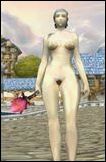
Re: TP's Hi-Res Model Tool (Latest build Jan. 9, 2010)

I see something in the INI that looks like it, #mapFileName = CREATURE\NAGAMALE\SIRENREFLECT.BLP, but as you can see, it's commented out.

I guess if anyone wanted to make a sexy, oiled-up body mod, now's the time.


Top
   
 
Posted: Thu Nov 25, 2010 11:47 am 
Gamer Lv:0 Exp:0%
Gamer Lv:0 Exp:0%

Joined: Wed Oct 20, 2010 12:06 pm
Posts: 3

Trollpaxton wrote:
I messed around with the BloodElf a little bit, and in the process discovered the wonderful Taper tool. I made her breasts and hips a bit bigger, and then her ass even bigger. Pretty curvy now. It's not a very good edit by any means but it amused me so I'll post it anyway.

Re: TP's Hi-Res Model Tool (Latest build Jan. 9, 2010)

http://www.mediafire.com/?yztwytjmzog
*whistle* Very nice, will be a good model to use while I try to find a race swap-improvement for 3.0.2


Top
   
 
Search for:
Display posts from previous:  Sort by  
New Topic Post Reply  [ 394 posts ]  Go to page
 Previous << 
1 ... 13, 14, 15, 16, 17, 18, 19 ... 40
 >> Next 

All times are UTC [ DST ]

 
  • Related topics

Who is online

Users browsing this forum: No registered users and 0 guests


You cannot post new topics in this forum
You cannot reply to topics in this forum
You cannot edit your posts in this forum
You cannot delete your posts in this forum
You cannot post attachments in this forum

Not able to open ./cache/data_global.php








