This is most likely, in every way, going to sound retarded...
I'm not gunna lie about it, I'll be completely frank, these wOw model edits are amazing, i used to have the huge tits on all my toons... it was great, made me way more interested in the game...
I suck with computers.. sadly for me... all i remember Pre 3.0.2.... all i had to do was run WoW.exe and Patch-H.MPQ in my data folder.. and i had big tits...
but now everything is complex and i easily got confused.... all i wanted was the amazing big boobs.. but when ever i do my old ideas.. all i see its Black character creation screens...
So my question is.... will there be any Beast enlargement mods that are just as easy to use...?
if not can some one please send me a Gettingbigboobsfordumbies guide.. i'd pretty much do any thing...
thanks again guys for all your hard work.. its amazing
Cams0x69 wrote: I was debating if there was a way to mangle one of the old mods into working with the newer models but...I'm not sure exactly what it'd entail since the new have extra meshes...so a simple "jam the old obj into the new m2" shouldn't work, should it?
There is very little chance of it working. The problem is that the OBJ files only contain some of the per-vertex information, not all of it. The program works as it does because it a) imports and exports the model's entire vertex array, and b) the process keeps the verts in the same order so that the vert at position x can be reaquainted with it's extra data. Model changes that change the number of verts...on bliz's end or ours...are pretty much doomed. Even if I could interpolate the extra data correctly (as I do when doing a subdivision pass), I still can't know where the verts were added and so the indexes are all thrown off.
Long story short: if bliz changed the number of verts or moved them around, it won't work. If they didn't, it will. _________________ Skins: Links:
It would be great to finally be able to work on a 3D vulva. Hell I believe I might even be up to the challenge of dusting off 3DSMax and attempting it myself as long as we know that it's feasible with this new tool. _________________
tancients wrote: -How do I load the textures on the model in 3ds
1) Open the Material Editor. 2) Select the "sphere in a box" in the upper left. 3) Down further in the box, click the "Maps" group to open it, then click the "None" to the right of "Diffuse Colors". 4) Double-click the "Bitmap" entry in the displayed list. 5) Browse to an appropriate PNG file skin. 6) Click the "Show Standard Map in Viewport" button (it looks like a blue and white checkered box. 7) In the main views, select the entire model. 8) Drag the sphere which should now have the texture on it onto the model. Chose "Assign to Selection".
tancients wrote: -Any tricks I can do to ease 'smoothing out' the breasts? I don't know, sorry...I know almost nothing about modeling.
tancients wrote: -Do the textures align only with the original vertecies? No, every vertex--original or inserted--has it's own texture coordinates that can be manipulated independently.
tancients wrote: -Any idea why none of the m2 files I make load in WMV? The program just closes out anytime it tries to load them. No, sorry. If you send me the file I can see if it loads on my machine. _________________ Skins: Links:
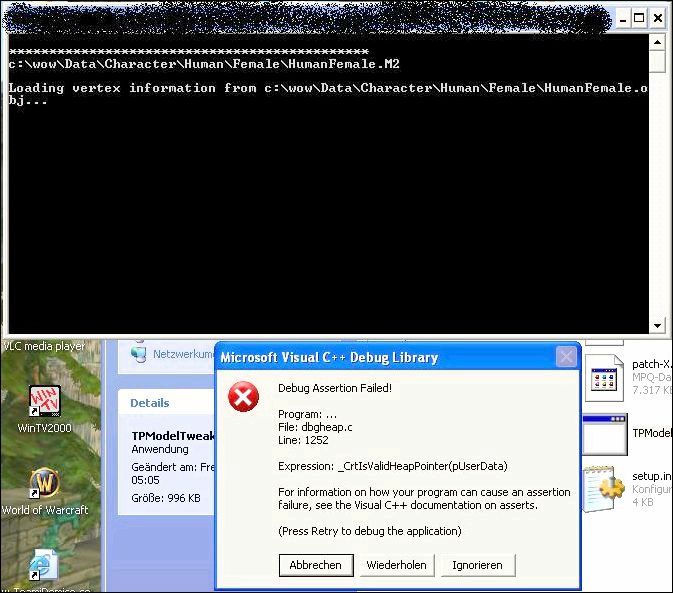
I'm having a problem with the model tool. Apparently If I export the Female bloodelf model using TP's model tool, and then reimport it back into an MPQ (even if I don't open it, or change it in 3ds max or any other editing program), I get a black screen and a crash.
I am using the latest version of ladik's MPQ editor as my MPQ packer, however it is not what causes this problem, as when I repack the default Female BloodElf model using MPQ editor, this does not occur.
When I attempt to run the Bloodelf model through Tp's model tool, I get a page of errors (although this actually seems to happen with many models, and so far this is the only one with problems like this)
Here is the log file for it,
I can use Densetsu's Bloodelf enhancement without problem, so the black screen seems to be just an issue with either the tool, my computer, or my method.
In addition, if I use bAddEnvMap = true on female dwarves, it bugs them and around half of their body ends up not showing up (depending on hair style and ring style, and gear equipped: helm, boots, gloves).
Can anyone help me? If not, can someone provide an upload of the Default BloodElf model that's been run through TP's model tool? Thanks for any assistance.
If you're not importing/exporting as .OBJ it's not going to work. Also, model editing tools used to make the edit process easier tend to add ghost verticies. So long as you avoid using them you should be fine.
Users browsing this forum: No registered users and 0 guests
You cannot post new topics in this forum You cannot reply to topics in this forum You cannot edit your posts in this forum You cannot delete your posts in this forum You cannot post attachments in this forum