Nude mod

Nude mod, nude patch and nude skins forum
Home Page FAQ Team Search
Login 
View unanswered posts View active topics  

Delete all board cookies

All times are UTC [ DST ]


New Topic Post Reply  [ 366 posts ]  Go to page
 Previous << 
1 ... 9, 10, 11, 12, 13, 14, 15 ... 37
 >> Next 
  Print view
Previous topic | Next topic 
Author Message
Posted: Wed Nov 24, 2010 4:23 am 
User avatar
Gamer Lv:0 Exp:0%
Gamer Lv:0 Exp:0%

Joined: Fri Nov 19, 2010 4:17 am
Posts: 4
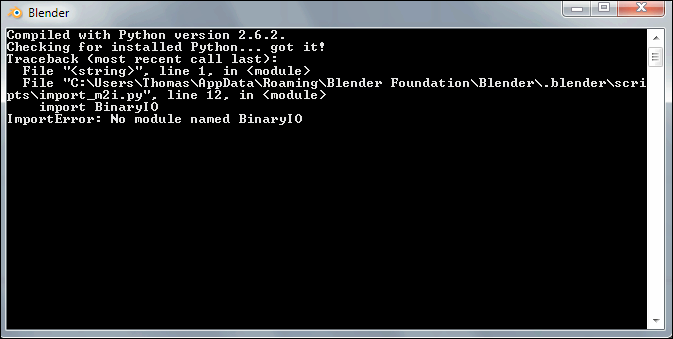
I tried importing the human female model into Blender using your tutorial, but I got this:

Re: M2Mod tool + Cromon's Injector (v4.03)(2011.01.14)
http://imageflock.com/img/1259344045.png


Top


Posted: Wed Nov 24, 2010 4:40 am 
User avatar
Gamer Lv:0 Exp:0%
Gamer Lv:0 Exp:0%

Joined: Sun Oct 31, 2010 3:03 pm
Posts: 3
I updated the tool to v1.1.

Updated seam fixing phase that is executed during M2I import when merging with the M2. Seam fixing is basically the process of finding duplicate vertices and averaging their positions and normals so they appear to be only one vertex.

Duplicate vertices are present on M2I import where there are UV texture coordinate mismatches between faces on a surface. This is because M2s store UV coordinates on a per-vertex basis whereas Blender stores UV coordinates with the face. As a side effect, blender will recalculate normals on the imported meshes and anywhere there are duplicate vertices there will be a visible seam. So, it's generally a good idea to remove doubles on the meshes after importing so Blender will merge the duplicates and remove the seam, but if you don't you should be OK too. M2Mod tries to fix seams during the merge process.

Seam fixing is done in 3 phases so it's somewhat complicated, but it's necessary to do it in this many phases so you have more control over which seams are fixed and which aren't. You might not want all the seams to be fixed, for example, at the corners of the mouth: you don't want a shared normal between the face and the inside of the mouth, that will look wrong.


The 3 phases are:

Submesh, vertices within submeshes are checked against each other to find seams. This phase removes seams within submeshes, but hopefully still leaves in seams that you want like where the mouth meets the face. Default angular tolerance is 60 degrees.

Body, vertices within body submeshes are checked against other body submeshes to find and remove seams. This phase removes seams between the body submeshes. Default angular tolerance is 90 degrees.

Clothing, vertices within clothing submeshes are checked against body submeshes to find and remove seams. This phase removes seams between body and clothes. Default angular tolerance is 45 degrees.

Default positional tolerance for all 3 phases is 0.0005 units.


I hope these changes can fix some issues, as well as open up additional possibilities.

Let me know what you think Re: M2Mod tool + Cromon's Injector (v4.03)(2011.01.14)
_________________
Want to work on a game? I am looking for volunteer Blender 2.5 artists and animators to work on characters and environments. Message me for more details.


Top
   
 
Posted: Wed Nov 24, 2010 4:56 am 
User avatar
Gamer Lv:0 Exp:0%
Gamer Lv:0 Exp:0%

Joined: Wed Nov 24, 2010 3:59 am
Posts: 3

redaxle wrote:
Zomg a User:
That error will be given if InputM2 in the INI is not defined. Make sure it's not commented out with a '#'.
InputM2 = C:\Program Files\World of Warcraft\M2Mod\Extract\NightElfFemale.m2
#OutputM2I = C:\Program Files\World of Warcraft\M2Mod\Extract\NightElfFemale.m2
InputM2I = C:\Program Files\World of Warcraft\M2Mod\Edited\NightElfFemale.m2i
#InputM2Copy = ...
OutputM2 = C:\Program Files\World of Warcraft\M2Mod\Edited\NightElfFemale.m2

I copied it directly from the M2ModGuide and changed the paths accordingly. Extract is where I extracted the stuff originally, and has all the originals, and Edited is, of course, the modded file folder.


Top
   
 
Posted: Wed Nov 24, 2010 6:05 am 
Gamer Lv:0 Exp:0%
Gamer Lv:0 Exp:0%

Joined: Wed Oct 27, 2010 4:39 pm
Posts: 4

md9066 wrote:
I'm fairly sure there are duplicate vertices because they are seperate geosets, and thus there are vertices that are essentially at the same location (at the seams). If you remove duplicates it might mess up the seams. I would have to test this out for myself to be sure, but for now it's just a suspicion of mine.
I actually mentioned the problem I found using blender to edit wow models in a number of occasions. For example. At one time I extracted dyable's bloodelf model to fix the weird sternum area. After I edit, I'd find extra shaded polygons in random locations all over my character. I was certain it was from blender because I tested it by just converting to and from .m2 <-->.m2i without going throubh blender and the problem did not appear. However, as soon as I import and export with blender, the model would imediately gain the unwanted shading. After some fiddling I found that alot of the vertecies have vertecies under them when I move them around, and so I thought I'd try removing the duplicated points to see. and Voila, the model out of the edit mode immediately looked super smooth and after exporting it into the game, the annoying shades are gone. What I concluded was that the shades were caused by the extra layers of mesh upon mesh embedded on top of eachother, causing them to cast shades onto each other. Which just as easily would cause programs like WMV to interpret it into weird shapes. As for the cause of it, I can only assume that there were coding errors in redaxle's plugin which caused redundancies when importing the .m2i files.

I have no idea if it'll solve SCDK's problem. but hey, W,6 is a 2 button step, couldnt' hurt to try.


Top
   
 
Posted: Wed Nov 24, 2010 6:06 am 
Gamer Lv:0 Exp:0%
Gamer Lv:0 Exp:0%

Joined: Wed Nov 24, 2010 5:08 am
Posts: 2
Thank you.

Joining and then separating them when I'm done would be the best way to make sure the verticies line up, right?
_________________

My DA page, My H-F page
Commissions: Information Updated on January 4, 2011


Top


Posted: Wed Nov 24, 2010 10:22 am 
Gamer Lv:0 Exp:0%
Gamer Lv:0 Exp:0%

Joined: Sat Nov 06, 2010 6:38 pm
Posts: 4

ScDK wrote:
Running into some oddity.

I've been reshaping the body for a while, without actually using subdivisions, to get the basics done before fine-tuning.
Now, i've made a copy and started working on refining the breast shape, to make it smooth and stuff, but...
It looks perfectly fine in Blender, but when i open the model in WoW Model Viewer, the breasts suddenly have a one row of vertexes on the upper side of both breasts moved down, almost following the bra texture's inner border. It kinda looks like the bra is too small for her size, and flesh bulges out at the sides.
Any idea what could cause this?

Re: M2Mod tool + Cromon's Injector (v4.03)(2011.01.14)
It"s quite noticeable while animated and less while on stand-still, but i picked a camera view to show it properly.


I think it's WMV itself that's - I guess you could say - not loading the poly count correctly.

Before 4.01, I was experiencing the same thing while I had dyable's blood elf model, or the human model, in game and then I turned on WMV and it looked like a lower poly count in there. In WoW, it looked smoother, better. But when I load the human model in WMV, it looked blockier. So I think it's something to do with WMV in my opinion.
_________________
Re: M2Mod tool + Cromon's Injector (v4.03)(2011.01.14)


Top
   
 
Posted: Wed Nov 24, 2010 10:41 am 
Gamer Lv:0 Exp:5%
Gamer Lv:0 Exp:5%

Joined: Wed Nov 24, 2010 9:44 am
Posts: 6
I dont usually like to shove my work down others throat... but im a bit desperate now.
I ll try not to give a tantrum, so just here are two GIFs of the animation i made for nightelfs in blender.

Re: M2Mod tool + Cromon's Injector (v4.03)(2011.01.14) Re: M2Mod tool + Cromon's Injector (v4.03)(2011.01.14)

Some info about them are at the end of my thread.

Edit: Oh, and good job/luck improving your skills in blender, ScDK. Re: M2Mod tool + Cromon's Injector (v4.03)(2011.01.14) (Sry, im so selfish Re: M2Mod tool + Cromon's Injector (v4.03)(2011.01.14))

Edit2: Swapped the links for improved anims. They way better imo.
_________________
The Sculptor

Why do i feel like its springtime already?


Top
   
 
Posted: Wed Nov 24, 2010 11:30 am 
Gamer Lv:0 Exp:5%
Gamer Lv:0 Exp:5%

Joined: Wed Nov 24, 2010 10:32 am
Posts: 6
Attachments are also stored as just points without any orientation, so any orientation would have to come from the animation of the bone that the attachment is child to or somewhere further up the bone chain. Currently there isn't any way that I know of to edit animations, and it's not something I'd want to add support for in the future.
_________________
Want to work on a game? I am looking for volunteer Blender 2.5 artists and animators to work on characters and environments. Message me for more details.


Top
   
 
Posted: Wed Nov 24, 2010 3:48 pm 
Gamer Lv:0 Exp:0%
Gamer Lv:0 Exp:0%

Joined: Sat Oct 16, 2010 11:28 am
Posts: 4

redaxle wrote:
That looks great ScDK. I was thinking of adding an option to amplify the breast movement (or maybe even bake in a simulation), but at the time I couldn't figure out how to access the animation data. Now I understand how animations are stored so I could probably add such a feature. But since blizzard sucks butt I'm going to hold off on working on that.

That would be awesome. Someone animating the bones 20 and 21 would be much appreciated, to have some natural movement.
The only thing that would remain to be fixed, would be the shoulders. I know more-or-less how to rig shoulders so they don't twist in such a horrible way, given i once converted / merged playermodels for UT2004 and SW:JK: Jedi Academy, just to learn how it works... but it makes you wonder why blizzard didn't do it to begin. Sure, low-poly, but that doesn't mean they have to make it look horrible.


marble wrote:
I dont usually like to shove my work down others throat... but im a bit desperate now.
I ll try not to give a tantrum, so just here are two GIFs of the animation i made for nightelfs in blender.

Re: M2Mod tool + Cromon's Injector (v4.03)(2011.01.14) Re: M2Mod tool + Cromon's Injector (v4.03)(2011.01.14)
OMFG... XD
That's customized animations, if i understand right.
You did all that, while i simply extended the weight of the breast bones on the Belf Femme's torso? XD God i'm so awful X_X;
_________________
My nude mod Threads:
, ,


Top
   
 
Posted: Wed Nov 24, 2010 7:13 pm 
Gamer Lv:0 Exp:0%
Gamer Lv:0 Exp:0%

Joined: Wed Nov 24, 2010 6:15 pm
Posts: 3

ScDK wrote:
Completely different UI and function sets. If someone can tell me what the Blender counterpart to Max's "Relax" modifier is, and if i can hide specific mesh/geosets of the model (had different programs where i couldn't, so it's not like that's a given) i would probably be able to work with it given some time.
I'll admit, it's hard to learn and the controls are unintuitive, but once you get proficient at it it is extremely efficient to work with. The biggest key to learning Blender has to be learning the keyboard shortcuts. You can't get by with just the mouse. The other key to learning would be to just spend time experimenting and trying things even if you don't know what they do. Learning by experimentation is a good way to learn.

Actually, the function sets are probably very similar, they just go by different names.

For Relax, I think the Blender counterpart is Smooth. In edit mode TAB, Select the vertices you want to Smooth, press W and select Smooth.

For hiding, just select whatever you want to hide and press H. To show everything again, press Alt+H.

Or instead of hiding you can separate objects onto different layers by selecting objects you want to move and pressing M, and you can select layers by pressing number keys. You can select all object by type by pressing Space, going to Select, Select All by Type... , Mesh, and then you can move all the meshes to another layer that way.

Sorry I can't really be any more help than that. All I can do is encourage you to learn Blender. Google is your friend to finding answers to your questions.

Unless someone wants to write an M2I importer/exporter for MAX or Maya!?
_________________
Want to work on a game? I am looking for volunteer Blender 2.5 artists and animators to work on characters and environments. Message me for more details.


Top
   
 
Search for:
Display posts from previous:  Sort by  
New Topic Post Reply  [ 366 posts ]  Go to page
 Previous << 
1 ... 9, 10, 11, 12, 13, 14, 15 ... 37
 >> Next 

All times are UTC [ DST ]

 
  • Related topics

Who is online

Users browsing this forum: No registered users and 0 guests


You cannot post new topics in this forum
You cannot reply to topics in this forum
You cannot edit your posts in this forum
You cannot delete your posts in this forum
You cannot post attachments in this forum

cron
Not able to open ./cache/data_global.php