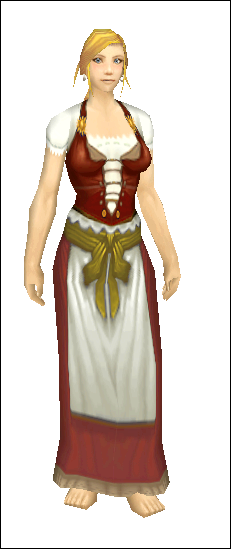
Just an update. Been working on a Gimp script that is coming together quite nicely and I'm rather proud of. Basically, here is my problem: I have many mods which require various permutations of the same basic things. For example, my "Sentai" pvp sets are all essentially the same thing, with one layer that determines the class color, a couple other layers which determine the "rank" (how many stripes on the arm), a few other layers which make the shadows
male/female, and a few more layers which switch between
pants/dress. Turning on/off all the appropriate layers manually and saving them out to the proper file names is a real pain in the ass.
So, I made it so Gimp reads tags from the layer names. [0, [1, etc determine permutation groups: Gimp will turn off all the layers in those groups when it starts, then turn on the first of each, then the second, etc, until it has gone through all the permutations. <A, <B, etc are tagged layers. You can specify layers to be associated with a given permutation layer by putting @ and then the tags for the other layers after it in the layer name. Finally, quoted strings are concatenated to build the final filename. It's slick as goose shit.
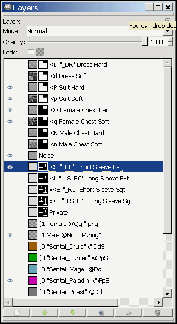
So for example, the system starts with the first layer in group [0, which in this case is '[0 "Sentai_Druid" @DdS'. (Why dress/short sleeve? Because I knew I wanted to map this to the
druid 4th season pvp gear, which is a short-sleeved dress.) This turns on the <D and <d layers, which are the dress shadings, and the <S layer, which is for short sleeves. Then it goes to the first layer in group [1, which is '[1 Female @Qq ".png" '. The <Q <q layers are the female-specific shadows (boobies!). (What's cool is all the layers in [1 are completely
transparent: their only purpose is to specify the labeled layers.)
The filename is all the strings concatenated in the order that they were encountered, so "Sentai_Druid" + "_DR" + ".png" = "Sentai_Druid_DR.png". Finally, the system goes through and saves the appropriate regions (upper torso, lower torso, etc) to files with the generated filename into the appropriate subdirectories ("TorsoUpperTexture\Sentai_Druid_DR.png", etc).
Basically, I can make a small change to an
outfit and regenerate all ~140 or so textures with the click of a button.

(And then convert them all, rename them to game
armor sets, and build an MPQ in a second click, heh.)
_________________
Skins:
Links: