Trollpaxton wrote: Well, if you can get those values you could probably get the exact x,y, and z ranges to subdivide just the nipples. The bummer is that when you start moving them around a lot it messes up the texture mapping, but that only really matters for nudes.
The other bummer is that I don't think Glitchy's tool effects the normals at all, and I think the normals effect how the polys are lit. Long story short, even if you craft nice 3D nipples I don't think the underside will be properly shadowed. I can look into that tomorrow.
Yeah, I noticed with the very first try of nipplage, I ended up stretching the texture to a point that it looked like the tip of the nipple was trying to suck the rest of the textures into it. My second try produced a better compromise. I will try to narrow down another run-through of the program and see what happens. [Answered my own question here] It shouldn't be too hard to isolate the nipple area.
Also, it's possible to get at least an illusion of the proper shadowing through textures. But that may end up being far more trouble than its worth considering how just enlarging the breasts in general strains them.
Cams0x69 wrote: This works nicely.
Very hard to edit the breasts once all those extra bits are added, but can get alot more out of it.
Yeah, I think the easiest way to go about it is to shape, increase polys, shape, increase polys, etc. I found that if you increase the polys from the beginning and try to work with it, it becomes a real pain in the ass to work with. _________________ -------------------------------------- Looking for larger breasts for your W0W characters? no further!
I as well am interested in getting 3dsmax 2010 to work with this. I have done a little fooling around... so far it appears that if you import and then immediately export the same file through 3dsmax 2010 the resulting obj file contains MANY more vertex normals than the original (nearly 5.5 times more) for each geoset (I can see this being a problem).
It also appears that the order of the blocks is changed. In the original file it first lists all the verticies then texture verticies then vertex normals, then faces. The file coming out of 3dsmax 2010 switches the vertex normals and texture verticies (verticies first, then vertex normals, texture verticies, faces).
Hopefully I will find a way to make it work, however right now I have a raid I must focus on. I will update you later.
Edit: Downtime FTL.
I got it to work (Importing then exporting the same file, then re-inject the exported file to the M2)
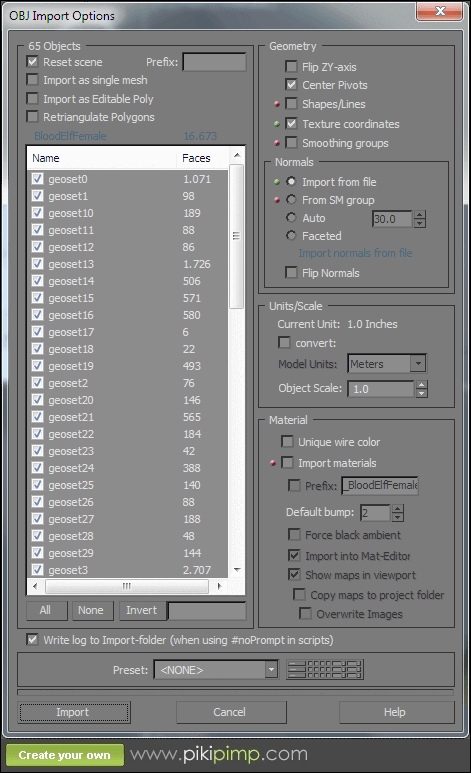
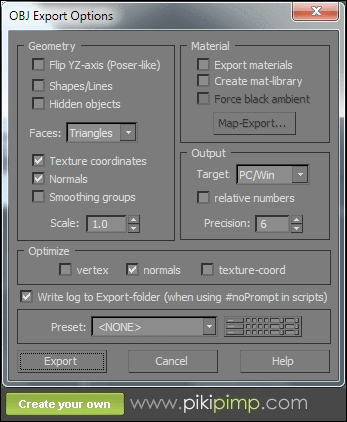
Here are the settings
for import:
for export:
Still raiding, will continue editing this post with updates.
Hi Trollpaxton, thanks for dynamically interacting =)
Well...this situation is complicated so I'll try to be as clear as I can. Take arms for example--you've found that forearms are separate from upper arms. Anything you or I do to merge the arms together is going to run into a big problem: there is not just one forearm. GeosetID 401 is the regular forearm, 402 is the forearm with one type of glove on, 403 is with another type of glove, and so on. So if you are looking to, for example, make a character's arm more muscular, you'd need to modify all of those forearm variants.
So that sucks. There is one thing to consider, though: it *is* possible to change the IDs of geosets, so for example you could disable all forearm variants and give the "naked" forearm geoset ID 0, which is the "always on" ID. That way you'd only have to modify one forearm. Of course, then you wouldn't ever see big poofy gloves or sleeves.
I understand what you mean but I wouldn't consider it such a problem. With previous programme version, there were no groups, yet the enhancing didn't occur on the gloves and misc clothes. I had to work on them separatly (I barely touched the glove parts actually) and it did'nt annoy me (except of course for the constant hiding/unhiding of elements). It isn't critical if the main bare arm part isn't in the same group as the gloves and such, because they don't always "flow" from the intersections (clumsy english!) and when they do (some wrist sections for instance) you can adjust it to the modified mesh so it doesn't look bad, you won't have to make them fit exactly to the edge skin surface of adjacent parts. I think it turned out ok on the troll (didn't check extensively though).
Or maybe I didn't understand, and you are telling me you can't isolate the bare arm part mechanically as it would mess up the alternative arm parts with clothes : P If its just a "visual" concern, making the "forearm with glove" parts coherent, it isn't much of a problem. Otherwise if its technically impossible to isolate just the bare arms well, let us forget about it!
As far as merging them together, I don't think it's impossible but it's harder than it sound's. Basically, each geoset at a junction has it's own copy of the vertices at the edge, so I'd have to determine which are coexistant, delete the extras, etc. I'm not going to make that a very high priority feature, though, since I think that right now the time it would take to implement would be greater than the time it would save.
I shouldn't have used the term "merge". What I meant was obtaining in the created obj a group layout that combines body groups. In other words, obtain directly in the output .obj what you get when you uncheck body geosets while importing into max (which as far as I know renders the max processed .obj not reinjectable as it doesn't contain the same grouping info as the original). The meshes are still there, they still are composed of different elements (torso, upper legs etc which you can see in element selection mode) but they are part of the same sub geoset group. Then you can modify multiple element meshes at the same time, to move intersection vertices you just have to select both juxtaposed vertices. It works fine ! That was what I was trying to imply, no need to merge meshes I believe.
I hope I understood what you said and wasn't completely off or something, thanks for the geosetID advice, haven't tried it but it'll come in handy.
stalker191 wrote: Does anyone know what the settings need to be for importing/exporting for 3ds Max 2011 now? Since they have changed from the previous versions, it keeps changing the vert count, even if I just import then export the file. I know it's something with 3ds Max, because it will work if I don't touch it with 3ds Max, so the config for the tool isn't the issue.
Go get 2008 or 2009. those kept the same general setup as per in the guide. To install 2008 I had to adjust my computer's year to like 2007 =P
Lyell wrote: While I don't have any problems extracting the blood elf model, or even injecting it and adding it to an .MPQ, any alteration kills it. Game crashes any time there's a blood elf on screen. I've tried including all other files normally included in the BloodElf/Female index with the modified model and 00.skin but with no success.
Yeah, I had problems with BElves back in 2.x as well, haven't tried since 3.0 though. I think it usually gave me black screens though, maybe some crashing, I don't remember. _________________ Visit for BIG higher-res boobs
thesixth wrote: Hi, I was wondering if there is a way to move or resize the texture mapping ? w0w totally crashes when I try to double up the texture size so I am trying to fit on a 150% sized skin instead.
WoW won't load any BLPs that have dimensions that aren't a power of 2 (256, 512, etc), so that's probably why it blew up.
Magius, seams are usually created when you edit the edge of a geoset in one way but you don't edit the edges of the adjacent geosets in exactly the same way. For example, if you just scale up a character's arms (part of the chest geoset), the edges of that geoset will no longer match any of the forearm geosets. Solutions? It's hard to fix after the fact, but the proactive way of avoiding them is to either avoid editing models around the seams, or to have all the relevant geosets turned on when you make your changes.
pkxman, you aren't giving us enough info to help you. What is the error you are getting? _________________ Skins: Links:
I've noticed when using Milkshape that if I use any of thier special tools it winds up adding ghost verts to the model. Have you tried moving individual points or groups manually, without using any tools?
Users browsing this forum: No registered users and 0 guests
You cannot post new topics in this forum You cannot reply to topics in this forum You cannot edit your posts in this forum You cannot delete your posts in this forum You cannot post attachments in this forum


















 .