Goggles wrote:
Still an Amazing mod but thought I'd point out a little flaw that's been a thorn in my side. I know the Draenei textures are Beta, just trying to help if you've not already spotted it.
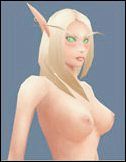
At certain angles the model shades weirdly specifically on the right side of the mouth (Oddly never the left) and just under the bust, this can happen in any shade of light, under streetlight, sunlight, pretty much everywhere dependant which way your character is facing. I know nooothing about model textures and shading and all that stuffs, so I'm unsure whether it could be my personal settings in WoW - If it is I'd love to know how to fix it. I say this because I don't think your example screen shots - Of the
Draenei Texture - have this shading mishap thingy.
Example and boobies inc;

It"s the strange shadow on the right hand side of her
lips that really gets me, sorry if you've spotted this already or it's been brought up in the last twelve pages.
Night Elf seems perfect and loving the quality of your stuff! :DThank you for raising this issue again, it has been pointed out to me before, but the reason I couldn't fix it then was because it was a issue with the import/export and conversion process, however the tools have been updated thanks to Redaxle, so I was able to fix it this time :) It had kinda slipped my mind till it was raised again, lol.
Voltage72 wrote:
The shading issue on the sides of the mouth has been brought up, and looked into I believe. Although I am unsure if Ry's findings were conclusive or if the issue can be fixed, it happens on other model edits as well for the Draenei. The shading issue under the bust was not mentioned although I am sure it is along the same lines as the mouth one and when/if a fix is found for one, it will effect them both.
As a character artist myself I would be intrigued to know the reasoning behind this and what the fix would be when it is found but am unable to offer any sure advice on what might fix it. My guess would be that even on the highest setting the shading is not that intricate as might be in other games. If you turn shading all the way up you get real-time full shadows, but you still don't get true self-shadows or layered shadows such as you would in say EQ2 (just to stick in the MMO category). The shading method here was meant for the lower poly world/characters and is probably drawn pretty crudely, and mesh tweaks and tricks are probably brought in to remedy issues like this. One thing that would probably show this would be if you rendered the lighting/shadows within Maya or Max or whichever you are using and see if the issue is there, I would bet it is not. Just my 2cents though, take it for what its worth. 8)The lighting issue near the mouth was caused by the import/export and conversion stage, which I've manage to fix now with the latest version of M2Mod.
The issue under the breasts however is a issue with the model, but I'll be damned if I can work out how to fix it, I've done some slight tweaks to make it less noticeable, but it's still there. The lighting issue there shows up in blender as well as in wow :(
_________________
Ry