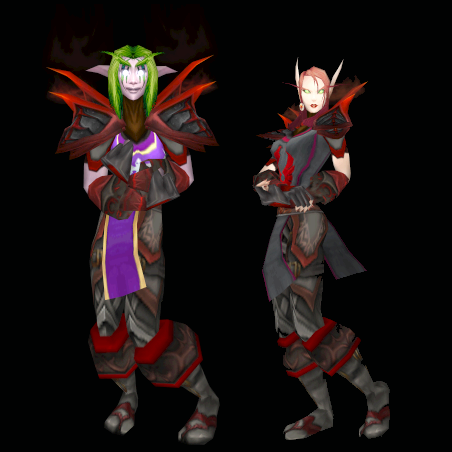
Daemon628 wrote: has anyone questioned the danger of this method?As dangerous as drinking water, the odds for drowning is far to minimal to call it a risk and so is this, however if your extremly paraniod then wait 2 weeks...
moonshade13 wrote: Here are my findings.... Data\Cache\SoundCache-patch-13154.MPQ - No longer works Data\Cache\SoundCache-patch-13286.MPQ - No longer works Data\Cache\SoundCache-patch-13164.MPQ - Works Data\Cache\SoundCache-patch-13287.MPQ - Works Data\Cache\SoundCache-patch-13329.MPQ - Works (High Priority entry name)Thanks for the Info to bad it cuts the list of files we can use down in half.. so merging is essential now...
moonshade13 wrote: Zilem, I have noticed that with the latest release of Patch-X, the loading screens do not scale correctly, as they did b4. They are basically too big ( the Dreanei for Kalimdor is cut off at the waste, U can only see the succubus, not the human in the on for Eastern Kingdoms, etc).
Hope this helps in some way.Well that is a change to the new Loadingscreens of the continents instead of having the black side borders i made the artwork us it's full width instead of width needed for non-widescreen loadingscreens if you don't like it's just to copy the 4 orginal once and add a "2" just before .blp
reddog78 wrote: Looks like the workaround is broken.......it seemed to eat my newly created MPQ and shrunk it to the place holder. Which Entry name did you use?
Fabiola wrote: My Armor Patch pretty much broke. And...WoW is overwriting MPQ Files again And the Cache Model Swapper is broke aswell <3 new patches.and what have this to do with my Creations? yes, barly anithing... do i need to Conflagurate Off-topic posts agian?
reddog78 wrote: Well, I managed to get it working using SoundCache-3.MPQ.
It looks like if you try to name it one of the SoundCache-patch#####.MPQs you'll have it eat it alive and lose all your hard work just like that.Where Ctrl+Z do not work, you should make Backups instead something goes wrong You don't want illidan to popup and shout "YOU WARE NOT PREPARED!"
martin25 wrote: I am almost utterly computer illiterate, so I need things simple. Each of the patches work individually if named SoundCache-3.mpq. However obviously I can only have 1 patch named that. How do I combine 2 or 3 together? I have the MPQ editor that everyone suggested, and I thought I'd merged them but apparently not. What do I do 2 combine Zilem's characters, creatures, Arohk's armory and that guy's loading screens? Or am I being unrealistic? The other Soundcaches no longer work so well confusedYou should no Longer use SoundCache-3.mpq use the two above marked with Green color
you need to get to merge two to Extract the contant of them (besure you extract the intitr folder structure.) when all is extracted, close all MPQ's and create a new call it "Whatever.MPQ" make sure to Tag on: "Create MPQ 2.0" "Create (Atribute) File" now drag n' drop the folder you Extracted: Character, Creature, World, Interface, Item. after you have done it copy it to the right folder and chose of the two green texted entry names above have chose yes to overwhrite
shilum wrote: i got the loading screen one, and the demon one to load, but i cant get any of your other ones to work, im copying over the sound patch #### mpq filesCould use more info on that
reddog78 wrote: Well, I managed to get it working using SoundCache-3.MPQ.
It looks like if you try to name it one of the SoundCache-patch#####.MPQs you'll have it eat it alive and lose all your hard work just like that. Fabiola wrote: Every single MPQ i try to replace gets Rewriten as soon as i start WoW. So for me it's all 100% broke and back to the normal WoW forever, getting kinda tired of blizzard MPQ changes by now. Fabiola wrote: Every single MPQ i try to replace gets Rewriten as soon as i start WoW. So for me it's all 100% broke and back to the normal WoW forever, getting kinda tired of blizzard MPQ changes by now. tancients wrote: All the MPQs you 'replace' in the cache folder ARE GOING TO GET REWRITTEN. The difference is, they're not deleting your changes, but simply adding in the important stuff that should've been there in the first place. Unless I've got some magic WoW client that is apparently having no issues with any patches on my home computer. :/Not unless there is a patch or some Content being Downloaded but for now i would say that the two i Green texted file above works for 4.0.3a atleast
gdp002 wrote: Well. Has anyone tried to make a backup of WoW's smallest .MPQ file and add the skins to such file? My guess is that it would work.That's what we currently do...
Eldhenn wrote: Try to set 'read only' attribute to those files. Fabiola wrote:
Doesn't work. The file does not get rewriten but nothing shows up ingame.Because that file is somewhat locked you need to use another file entry to have it work, loot at the two green texted above if it do not work with those then your Atribute file is incorrect with the rest of the MPQ and needs to be recompiled.
ravenfrost21 wrote: the highelf patchzer doesnt work anymore could you get it back working with 4.03 be awesome
P.S Love your work Zilem amazing stuff.Posible you could define not working will spare time used/wasted...
reddog78 wrote: Setting the attribute to 'read only' isn't causing it to load 'em up, now. They have changed it up again on us.So by locking the files they don't get used? or what are you trying to say? _________________ [
most impressive Zilem, that has got to be not only the best, but the simplest way for any user to find and see what they looking for.
mad props _________________ Do not walk behind me, for I may not lead. Do not walk ahead of me, for I may not follow. Do not walk beside me either. Just pretty much leave me alone.
I still have to Make: Sexy Armors (Leggings) NPC skins (the alt of you are Wating for...) Savior Delight (and aswell update Fix the MPQ file...) Add a Archive Section Add a Wall of text of whats within all patchzer -(but that will have to wait till i can make a Scroll menu because the list is Sky tall) and little here and there
maybe i shod had put this into the Zip File.... i guess it will have to be another night
warmaster789 wrote: i dont know if this helps at all but when i noticed you put the flash up on newgrounds i went and vote 5 straight away to keep it up there seeing as how i used to be an avid newgrounds user and have the voting power of 5 people just trying to do my part Well the Flash have outgrown Newgounds 10Mb Limit, it's Current 13.004 Mb so i have put it on a Random flash host for the time being ;p _________________ [ on Sun Dec 30, 2007 7:17 am, edited 1 time in total.
skaya wrote: Juubi wrote: Would it be possible to upload it on megaupload or something, mediafire is slooooooow! it takes a while do download a huuuge patch, mediafire are useally fast but your internet may be slow. =Az
You must admit, 20kb/s is slow... _________________ I LOVE MY GIRLFRIEND HORNYSLUT!
Darathos wrote: Now, before I got downloading unkown programs, (safty reasons); is this the wowme program you talk about requiering to run "patch-Q" in the read me file?
If this is not do you mind posting a link to the program download? Because I had issuses trying to find it on
Thank you.
There should be a link located in one of the many WOWME threads in this forum.
Users browsing this forum: No registered users and 0 guests
You cannot post new topics in this forum You cannot reply to topics in this forum You cannot edit your posts in this forum You cannot delete your posts in this forum You cannot post attachments in this forum


















 Which Entry name did you use?