ihaxxu wrote:
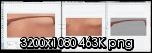
The one on the far right is my horribly altered
underwear, the next one to the left is an example of what im pasting to, and the one on the far left is the result..as you can tell, the one on the far left is horribly dull. It seems that anything i copy this way is reduced in color..as if it changes 32bit(24?) color to 8bit or 16bit.
I also use Gimp and I'm not always satisfied with the way it reduces its colors down to 256 (Image > Mode > Indexed), especially with regards to transparent pixels... a lot of the time it seems like it refuses to allow pixels at the edge of a texture to remain partially transparent, which is important for avoiding that pixilated look.
But that said, I always save my work files in the .xcf "Gimp" file format until the last step before I index it down to 256 colors and save it as a .png. This helps to not lose color depth as I work.
For your purpose, I would cut out the
bikini and paste it on a separate
transparent layer, make sure to have it saved separately, then merge it down onto your nude texture at the end. Also make sure you use Antialiasing with the Free Select Tool, it looks like you have it turned off.
When doing free selects using anti-aliasing, zoom in as much as possible (I go all the way to 800%), this will make your selects a lot more smooth from pixel to pixel. Learn to use the Add To Current Selection and Subtract From Current Selection features of the Free Select tool, so when you make a selection that is good but not perfect, you can back up and fix just the parts that need fixing, instead of making the selection all over again.
Oh yeah I use an old version of Gimp, 2.4.7, because I didn't like some of the changes in 2.6. So some of this isn't guaranteed to be the same in the latest version, but it probably is

.























